La columna Campaign Email Templates section allows users to create, manage, and customize email templates used across different campaign types within TIDWIT. This module is designed to streamline email communications while ensuring consistency and flexibility.
Dashboard
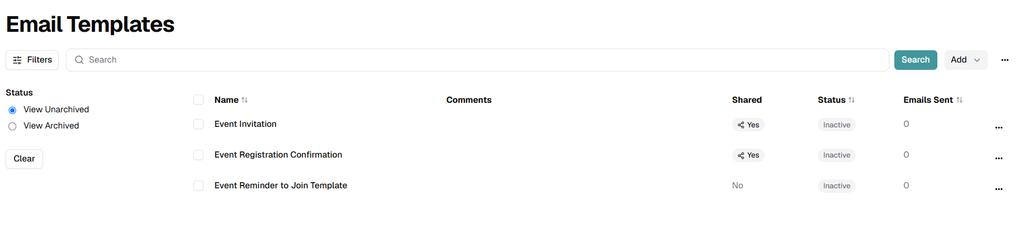
La columna Dashboard displays a list of all existing email templates in a table format, providing a quick overview and easy access to key actions.
Displayed Information
Each row in the table includes the following information:
- Nombre: The name of the email template.
- Comments: Optional notes or internal descriptions.
- Estado: Indicates whether the template is active or inactive.
- Emails Sent: The total number of emails sent using this template.
Template Actions (Three-Dot Menu)
Each template includes an actions menu (three-dot icon) with the following options:
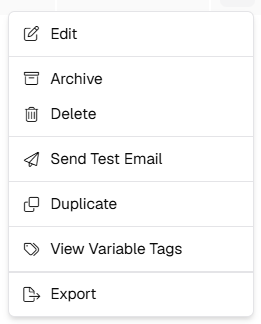
- Editar: Open the template for modification.
- Archive: Archive the template for historical reference.
- Eliminar: Permanently remove the template.
- Enviar correo electrónico de prueba: Send a test email to verify layout and content.
- Duplicate: Create a copy of the template.
- View Variable Tags: View available dynamic variables that can be used in the template.
- Export: Download the template for external use or backup.
Create a New Template
To create a new email template, select the option to add a new template from the dashboard. This opens the Información Básica form.

Required Fields
- Nombre: Enter a descriptive name for the template.
- Tipo: Select the template type. Available options include:
- Email Campaigns: Learning, Ecosystem, Blast
- Email Campaigns: Notify Ecosystem Admins
- Comments: Optional field for internal notes or context.
Once the required information is completed, click Guardar to proceed to the template editor.
Template Editor
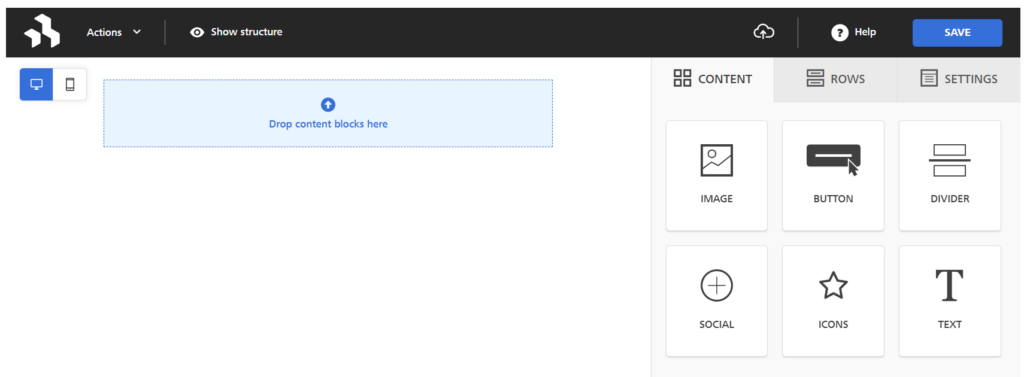
La columna Template section provides a visual drag-and-drop editor that allows users to design and customize the email layout.
Editor Features
- Content Blocks: Add and arrange elements such as:
- – Images
- – Text
- – Buttons
- – Dividers
- – Icons
- – Social components
- Rows: Structure the layout using rows and columns.
- Ajustes: Configure global styles such as background color, padding, and responsiveness.
Users can drag content blocks into the canvas area and customize each element to match branding and communication needs.
Once the template design is complete, click Guardar to store the changes.
This functionality ensures flexible, reusable, and scalable email communications across campaigns in TIDWIT.